 # Airtng App: Part 1 - Workflow Automation with Twilio - Laravel

> We are currently in the process of updating this sample template. If you are encountering any issues with the sample, please open an issue at [github.com/twilio-labs/code-exchange/issues](https://github.com/twilio-labs/code-exchange/issues) and we'll try to help you.
## About
Learn how to automate your workflow using Twilio's REST API and Twilio SMS. This example app is a vacation rental site where the host can confirm a reservation via SMS.
[Read the full tutorial here](https://www.twilio.com/docs/tutorials/walkthrough/workflow-automation/php/laravel)!
Implementations in other languages:
| .NET | Java | Python | Ruby | Node |
| :--- | :--- | :----- | :-- | :--- |
| [Done](https://github.com/TwilioDevEd/airtng-csharp-dotnet-core) | [Done](https://github.com/TwilioDevEd/airtng-servlets) | [Done](https://github.com/TwilioDevEd/airtng-flask) | TBD | [Done](https://github.com/TwilioDevEd/airtng-node) |
## Set up
### Requirements
- [PHP >= 7.2.5](https://www.php.net/) and [composer](https://getcomposer.org/)
- A Twilio account - [sign up](https://www.twilio.com/try-twilio)
- The application uses [sqlite3](https://www.sqlite.org/) as the persistence layer. If you don't have it already, you should install it.
### Twilio Account Settings
This application should give you a ready-made starting point for writing your own application.
Before we begin, we need to collect all the config values we need to run the application:
| Config Value | Description |
| :---------------- | :----------------------------------------------------------------------------------------------------------------------------------------------------------- |
| Account Sid | Your primary Twilio account identifier - find this [in the Console](https://www.twilio.com/console). |
| Auth Token | Used to authenticate - [just like the above, you'll find this here](https://www.twilio.com/console). |
| Phone number | A Twilio phone number in [E.164 format](https://en.wikipedia.org/wiki/E.164) - you can [get one here](https://www.twilio.com/console/phone-numbers/incoming) |
### Local development
After the above requirements have been met:
1. Clone this repository and `cd` into it
```bash
git clone git@github.com:TwilioDevEd/airtng-laravel.git
cd airtng-laravel
```
1. Install PHP dependencies
```bash
make install
```
1. Set your environment variables
```bash
cp .env.example .env
```
See [Twilio Account Settings](#twilio-account-settings) to locate the necessary environment variables.
1. Expose the application to the wider Internet using [ngrok](https://ngrok.com/)
```bash
$ ngrok http 8000
```
Once you have started ngrok, update your Twilio number sms URL settings to use your ngrok hostname. It will look something like this:
```
http://.ngrok.io/reservation/incoming
```
6. Configure Twilio to call your webhooks.
You will also need to configure Twilio to send requests to your application when sms are received.
You will need to provision at least one Twilio number with sms capabilities so the application's users can make property reservations. You can buy a number [right here](https://www.twilio.com/user/account/phone-numbers/search). Once you have a number you need to configure it to work with your application. Open [the number management page](https://www.twilio.com/user/account/phone-numbers/incoming) and open a number's configuration by clicking on it.
Remember that the number where you change the sms webhooks must be the same one you set on the `TWILIO_NUMBER` environment variable.
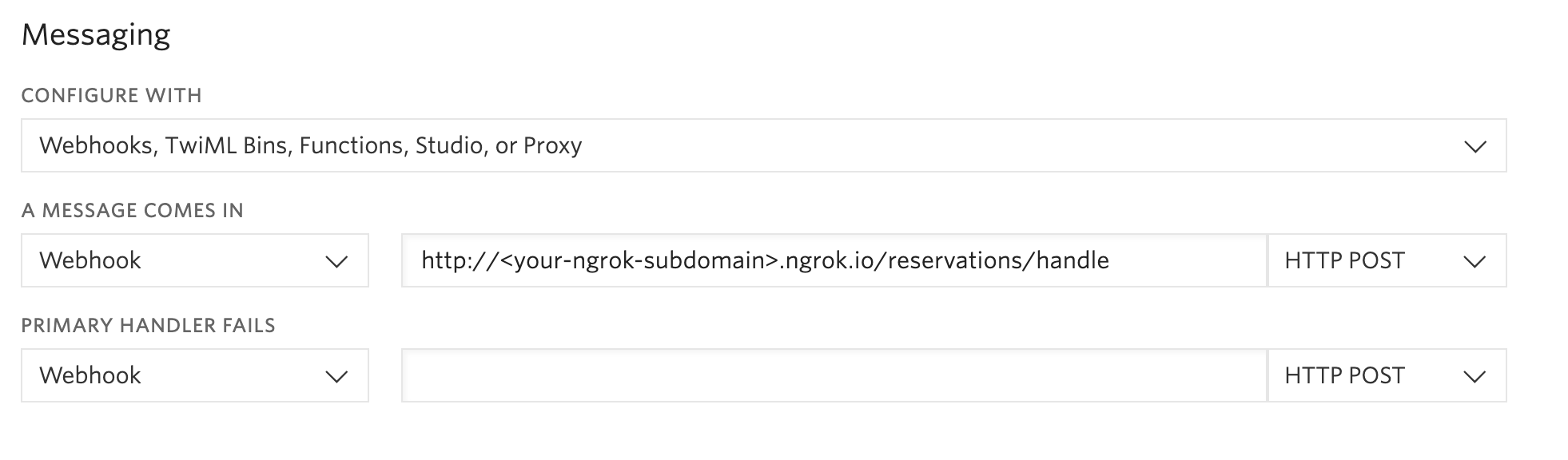
For this application, you must set the voice webhook of your number so that it looks something like this:
```
http://.ngrok.io/reservation/incoming
```
And in this case set the `POST` method on the configuration for this webhook.
1. Run the application
```bash
make serve
```
1. Navigate to [http://localhost:8000](http://localhost:8000)
That's it!
### Docker
If you have [Docker](https://www.docker.com/) already installed on your machine, you can use our `docker-compose.yml` to setup your project.
1. Make sure you have the project cloned.
2. Setup the `.env` file as outlined in the [Local Development](#local-development) steps.
3. Run `docker-compose up`.
4. Follow the steps in [Local Development](#local-development) on how to expose your port to Twilio using a tool like [ngrok](https://ngrok.com/) and configure the remaining parts of your application.
### Unit and Integration Tests
First, run the migrations for the testing database.
```bash
php artisan migrate --database=testing
```
You can run the Unit tests locally by typing:
```bash
vendor/bin/phpunit
```
### Cloud deployment
Additionally to trying out this application locally, you can deploy it to a variety of host services. Here is a small selection of them.
Please be aware that some of these might charge you for the usage or might make the source code for this application visible to the public. When in doubt research the respective hosting service first.
| Service | |
| :-------------------------------- | :------------------------------------------------------------------------------------------------------------------------------------------------------------------------------------------------------------------------ |
| [Heroku](https://www.heroku.com/) | [](https://heroku.com/deploy) |
## Resources
- The CodeExchange repository can be found [here](https://github.com/twilio-labs/code-exchange/).
## Contributing
This template is open source and welcomes contributions. All contributions are subject to our [Code of Conduct](https://github.com/twilio-labs/.github/blob/master/CODE_OF_CONDUCT.md).
## License
[MIT](http://www.opensource.org/licenses/mit-license.html)
## Disclaimer
No warranty expressed or implied. Software is as is.
[twilio]: https://www.twilio.com
# Airtng App: Part 1 - Workflow Automation with Twilio - Laravel

> We are currently in the process of updating this sample template. If you are encountering any issues with the sample, please open an issue at [github.com/twilio-labs/code-exchange/issues](https://github.com/twilio-labs/code-exchange/issues) and we'll try to help you.
## About
Learn how to automate your workflow using Twilio's REST API and Twilio SMS. This example app is a vacation rental site where the host can confirm a reservation via SMS.
[Read the full tutorial here](https://www.twilio.com/docs/tutorials/walkthrough/workflow-automation/php/laravel)!
Implementations in other languages:
| .NET | Java | Python | Ruby | Node |
| :--- | :--- | :----- | :-- | :--- |
| [Done](https://github.com/TwilioDevEd/airtng-csharp-dotnet-core) | [Done](https://github.com/TwilioDevEd/airtng-servlets) | [Done](https://github.com/TwilioDevEd/airtng-flask) | TBD | [Done](https://github.com/TwilioDevEd/airtng-node) |
## Set up
### Requirements
- [PHP >= 7.2.5](https://www.php.net/) and [composer](https://getcomposer.org/)
- A Twilio account - [sign up](https://www.twilio.com/try-twilio)
- The application uses [sqlite3](https://www.sqlite.org/) as the persistence layer. If you don't have it already, you should install it.
### Twilio Account Settings
This application should give you a ready-made starting point for writing your own application.
Before we begin, we need to collect all the config values we need to run the application:
| Config Value | Description |
| :---------------- | :----------------------------------------------------------------------------------------------------------------------------------------------------------- |
| Account Sid | Your primary Twilio account identifier - find this [in the Console](https://www.twilio.com/console). |
| Auth Token | Used to authenticate - [just like the above, you'll find this here](https://www.twilio.com/console). |
| Phone number | A Twilio phone number in [E.164 format](https://en.wikipedia.org/wiki/E.164) - you can [get one here](https://www.twilio.com/console/phone-numbers/incoming) |
### Local development
After the above requirements have been met:
1. Clone this repository and `cd` into it
```bash
git clone git@github.com:TwilioDevEd/airtng-laravel.git
cd airtng-laravel
```
1. Install PHP dependencies
```bash
make install
```
1. Set your environment variables
```bash
cp .env.example .env
```
See [Twilio Account Settings](#twilio-account-settings) to locate the necessary environment variables.
1. Expose the application to the wider Internet using [ngrok](https://ngrok.com/)
```bash
$ ngrok http 8000
```
Once you have started ngrok, update your Twilio number sms URL settings to use your ngrok hostname. It will look something like this:
```
http://.ngrok.io/reservation/incoming
```
6. Configure Twilio to call your webhooks.
You will also need to configure Twilio to send requests to your application when sms are received.
You will need to provision at least one Twilio number with sms capabilities so the application's users can make property reservations. You can buy a number [right here](https://www.twilio.com/user/account/phone-numbers/search). Once you have a number you need to configure it to work with your application. Open [the number management page](https://www.twilio.com/user/account/phone-numbers/incoming) and open a number's configuration by clicking on it.
Remember that the number where you change the sms webhooks must be the same one you set on the `TWILIO_NUMBER` environment variable.

For this application, you must set the voice webhook of your number so that it looks something like this:
```
http://.ngrok.io/reservation/incoming
```
And in this case set the `POST` method on the configuration for this webhook.
1. Run the application
```bash
make serve
```
1. Navigate to [http://localhost:8000](http://localhost:8000)
That's it!
### Docker
If you have [Docker](https://www.docker.com/) already installed on your machine, you can use our `docker-compose.yml` to setup your project.
1. Make sure you have the project cloned.
2. Setup the `.env` file as outlined in the [Local Development](#local-development) steps.
3. Run `docker-compose up`.
4. Follow the steps in [Local Development](#local-development) on how to expose your port to Twilio using a tool like [ngrok](https://ngrok.com/) and configure the remaining parts of your application.
### Unit and Integration Tests
First, run the migrations for the testing database.
```bash
php artisan migrate --database=testing
```
You can run the Unit tests locally by typing:
```bash
vendor/bin/phpunit
```
### Cloud deployment
Additionally to trying out this application locally, you can deploy it to a variety of host services. Here is a small selection of them.
Please be aware that some of these might charge you for the usage or might make the source code for this application visible to the public. When in doubt research the respective hosting service first.
| Service | |
| :-------------------------------- | :------------------------------------------------------------------------------------------------------------------------------------------------------------------------------------------------------------------------ |
| [Heroku](https://www.heroku.com/) | [](https://heroku.com/deploy) |
## Resources
- The CodeExchange repository can be found [here](https://github.com/twilio-labs/code-exchange/).
## Contributing
This template is open source and welcomes contributions. All contributions are subject to our [Code of Conduct](https://github.com/twilio-labs/.github/blob/master/CODE_OF_CONDUCT.md).
## License
[MIT](http://www.opensource.org/licenses/mit-license.html)
## Disclaimer
No warranty expressed or implied. Software is as is.
[twilio]: https://www.twilio.com